 Skip to content


- Tip #1: Use the Bookmarks Bar to Quickly Access School Resources
- Tip #2: Create Folders in Google Drive by Subject and Grade
- Tip #3: Filter and Archive Your Emails for a Cleaner Inbox
- Build Digital Habits That Last
- Which Tech Tip Will You Try?
School comes with constant digital clutter: crowded inboxes, unorganized Google Drives, and browser tabs that never end. Many students end up spending more time searching for resources than actually doing the work. But a few student organization tools can make all the difference.
This blog will walk you through three practical tech tips for school that help students get organized, reduce stress, and save valuable time each day.
Tip #1: Use the Bookmarks Bar to Quickly Access School Resources
When your key sites are always visible and accessible, you save time and brainpower that you can use for your assignments instead.
If you visit the same websites every day for school like Google Classroom, Quizlet, or your grade portal, there’s no need to waste time typing them in each time. Instead, create a bookmarks to gives you one-click access to all your important tools.
To create bookmarks:
- Open your Chrome browser
- Use Ctrl + Shift + B (or Cmd + Shift + B on Mac) to turn on the bookmarks bar
- Navigate to a useful site and click the star icon on the top-right to save it
- Choose “Bookmarks Bar” as the save location
When your key sites are always visible and accessible, you save time and brainpower that you can use for your assignments instead.
Looking for more tech-powered learning ideas? You might enjoy Quizlet’s AI Features: Turn Your Notes into Flashcards, which explores how students use AI tools to study smarter.

Tip #2: Create Folders in Google Drive by Subject and Grade
Google Drive can get messy fast. Without folders, it becomes a challenge to locate the assignment you need, especially when you’re rushing to finish homework.
A good solution is to create structured folders. Here’s how:
- Open Google Drive
- Click “My Drive”, then “New” → “Folder”
- Create a main folder for your current grade (i.e. “10th Grade”)
- Inside that, make subfolders for each class like “Science,” “Math,” and “History”
Organizing files into folders lets you find what you need without digging through piles of old Docs and Slides. It’s one of the easiest student organization tools to try. This tip is especially helpful at the beginning of a semester.
If disorganization is causing more than just digital clutter, it may be linked to common executive function challenges like procrastination or task avoidance. For strategies that address the root of these struggles, check out Why You Procrastinate on Studying + How to Fix It Now.


Tip #3: Filter and Archive Your Emails for a Cleaner Inbox
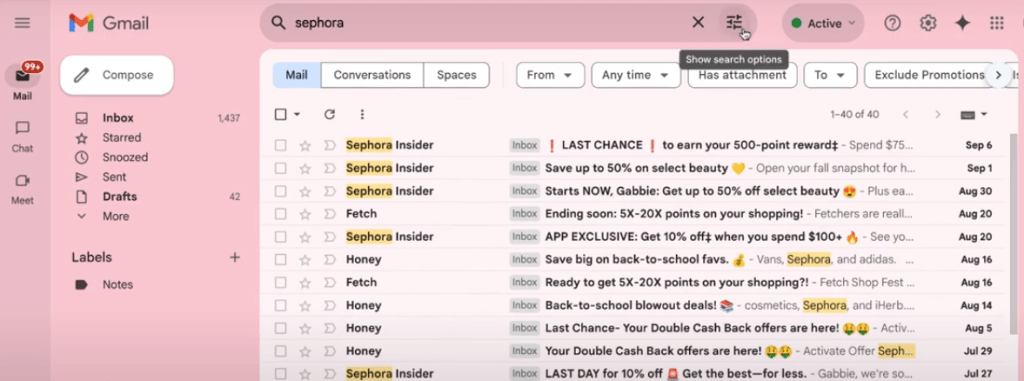
Your inbox can get out of control quickly, especially when promotional emails or school notifications pile up. An inbox with hundreds of unread messages can make it difficult to spot the ones that really matter.
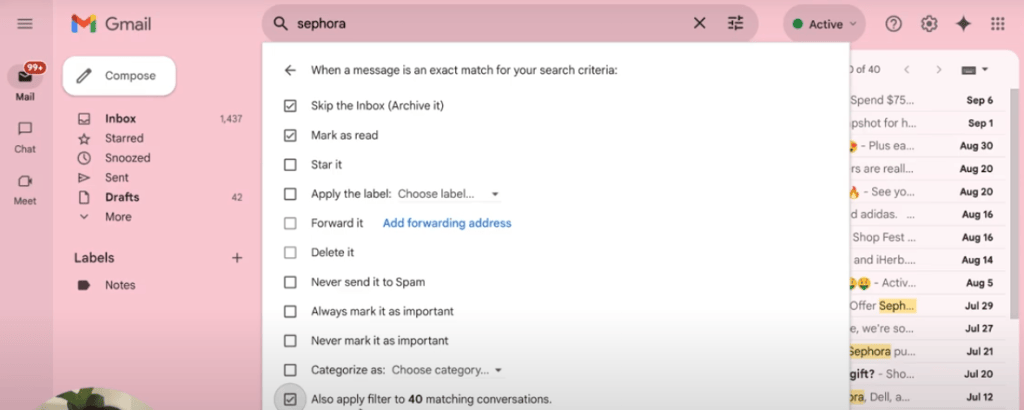
You can use Gmail’s built-in features to filter and archive efficiently:
- Search for a sender (like a store or newsletter)
- Click the three-dot menu and select “Create filter”
- Check “Skip the inbox” and “Mark as read”
- Apply the filter to similar existing emails
Now your inbox will only show emails that actually need your attention. This makes it easier to manage school communications without missing anything important.
Want to take it a step further? Open Gmail settings, go to Inbox Type, and set it to show Unread first or Important first. This reorders your inbox so you can focus on high-priority messages.
Build Digital Habits That Last
Staying digitally organized doesn’t require dozens of apps or hours of effort.
Staying digitally organized doesn’t require dozens of apps or hours of effort. With just a few simple changes, you can stay on top of your assignments, save time each day, and reduce the feeling of being overwhelmed.
To recap, here are three student organization tools worth using:
- Bookmarks bar for fast website access
- Google Drive folders for subject-based organization
- Email filters to clean up your inbox and stay focused
These systems create clarity and structure in your school day, helping you get back valuable time and energy. They’re easy to set up and even easier to maintain once they’re in place.
Which Tech Tip Will You Try?
Do you want to declutter your inbox, organize your files, or streamline your browser first?
Let us know in the comments!


